VOD ProfileSets
Profile is an important part that defines the video output resolution, video output bitrate, and audio output bitrate for encoding. Furthermore, it will also affect the costing of encoding, storage usages of encoded video and the CDN usages while watching the VOD.
In BlendVision, you need to define your VOD’s output resolution and bitrate by adding the profiles into ProfileSet. It will define the codec and streaming protocol of your encoding output for each VOD.
BlendVision provides the ability for you to easily produce adaptive streaming by customizing your owned ProfileSets or directly using the optimal presets we provide.
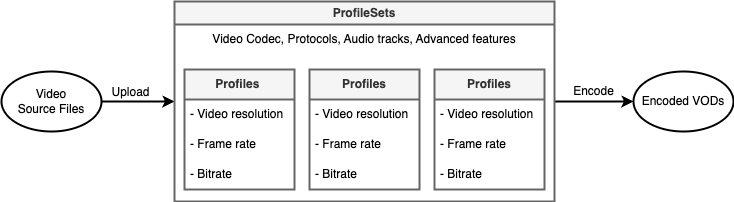
In this article, we’ll introduce VOD ProfileSet features and the preset list you can use for encoding.
Access VOD ProfileSet list
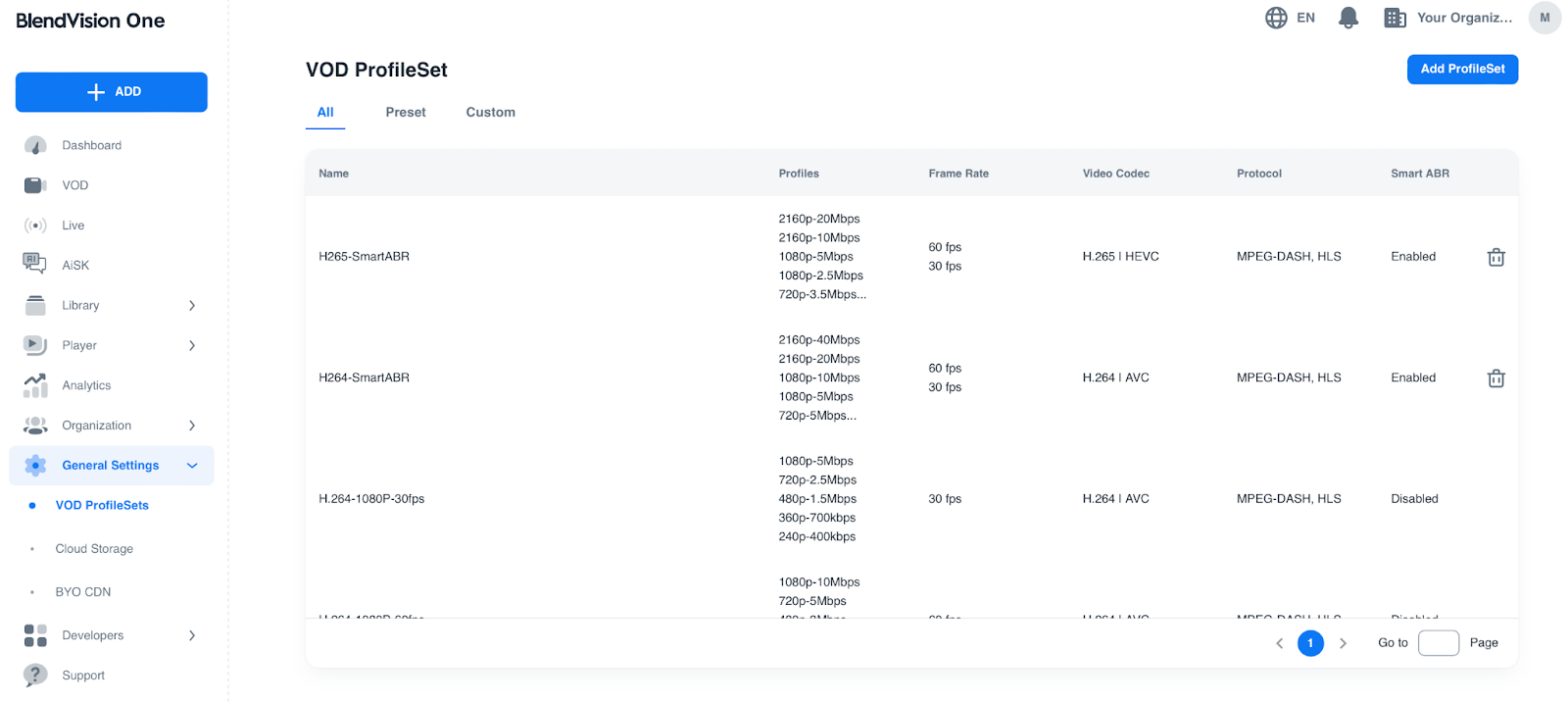
You can confirm all ProfileSets via the General Settings module on BlendVision Web Console.
1. Press “General Settings” on the left sidebar on BlendVision Web Console, then click “VOD ProfileSets” to access VOD ProfileSet list.
2. Create New ProfileSet
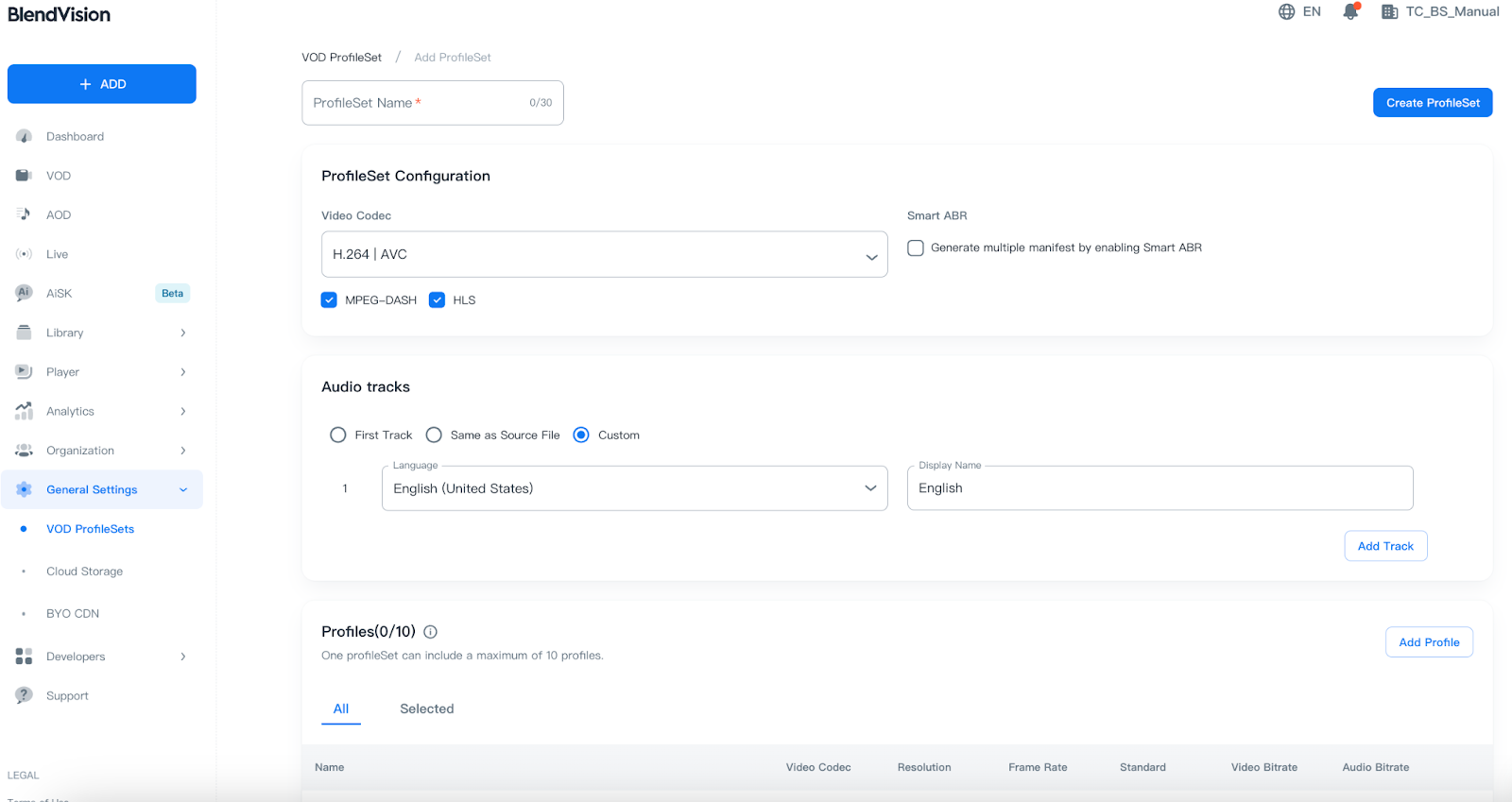
Click Add ProfileSet to create a new ProfileSet.
Input your preferred ProfileSet name into the “ProfileSet Name” field. The default name is ProfileSet Name.
Select preferred ProfileSet Configuration, Audio tracks and Profiles before clicking Create ProfileSet.
- Audio tracks: Support subtitle language with multi-country codes and multi-language codes display when you select “Custom”.
- Profiles: One profileSet can include a maximum of 10 profiles.
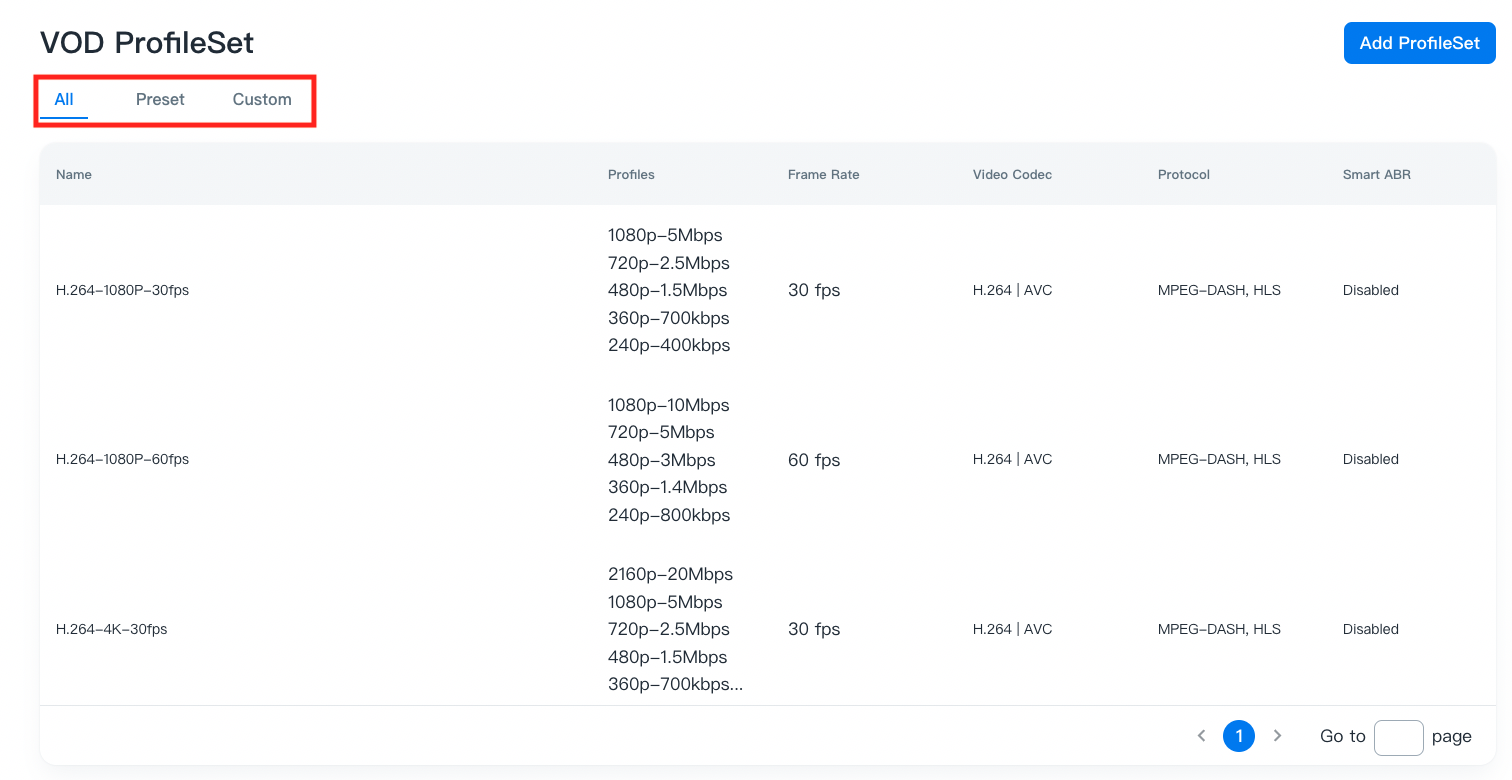
After ProfileSet is created, you can confirm current VOD ProfileSets that you can use in All/Preset/Custom tab and manage the ProfileSets.
Preset ProfileSets
In Preset tab, BlendVision has prepared multiple presets with popular profiles to fit the most requirements. These presets cater to a wide range of requirements, making it easier for users to select the optimal settings for their content.
Here's the table of each presets:
Name
Profiles
Frame Rate
Video Codec
Audio Tracks
Protocol
H.264-1080P-30fps
- 1080p-5Mbps
- 720p-2.5Mbps
- 480p-1.5Mbps
- 360p-700kbps
- 240p-400kbps
30 fps
H.264 | AVC
First Track
MPEG-DASH, HLS
H.264-1080P-60fps
- 1080p-10Mbps
- 720p-5Mbps
- 480p-3Mbps
- 360p-1.4Mbps
- 240p-800kbps
60 fps
H.264 | AVC
First Track
MPEG-DASH, HLS
H.264-4K-30fps
- 2160p-20Mbps
- 1080p-5Mbps
- 720p-2.5Mbps
- 480p-1.5Mbps
- 360p-700kbps
- 240p-400kbps
30 fps
H.264 | AVC
First Track
MPEG-DASH, HLS
H.264-4K-60fps
- 2160p-40Mbps
- 1080p-10Mbps
- 720p-5Mbps
- 480p-3Mbps
- 360p-1.4Mbps
- 240p-800kbps
60 fps
H.264 | AVC
First Track
MPEG-DASH, HLS
H.265-1080P-30fps
- 1080p-2.5Mbps
- 720p-1.7Mbps
- 480p-1.0Mbps
- 360p-500kbps
- 240p-300kbps
30 fps
H.265 | HEVC
First Track
MPEG-DASH, HLS
H.265-1080P-60fps
- 1080p-5Mbps
- 720p-3.5Mbps
- 480p-2.1Mbps
- 360p-1.0Mbps
- 240p-500kbps
60 fps
H.265 | HEVC
First Track
MPEG-DASH, HLS
H.265-4K-30fps
- 2160p-10Mbps
- 1080p-2.5Mbps
- 720p-1.7Mbps
- 480p-1.0Mbps
- 360p-500kbps
- 240p-300kbps
30 fps
H.265 | HEVC
First Track
MPEG-DASH, HLS
H.265-4K-60fps
- 2160p-20Mbps
- 1080p-5Mbps
- 720p-3.5Mbps
- 480p-2.1Mbps
- 360p-1.0Mbps
- 240p-500kbps
60 fps
H.265 | HEVC
First Track
MPEG-DASH, HLS
Note:
- These presets are not allowed for editing. You can refer to the configurations of these suggested presets, to create your own custom ProfileSets.
Custom ProfileSets
In Custom tab, it’ll list up the custom ProfileSets you created before.
You can easily custom and manage your own ProfileSets to meet the needs of your streaming service, to achieve the best balance between quality and cost.
Refer to these articles for customizable settings and the detailed information:
- Customize ProfileSets for adding, editing, and deleting custom ProfileSets.
- Customize Profiles for adding and deleting customized profiles for each custom ProfileSets.
Select the preferred ProfileSet for your VOD
To apply the ProfileSet’s configurations for your VOD’s output, you will need to select the preferred ProfileSet when you add a new VOD.
For the detailed steps on selecting the ProfileSet for each VOD, please refer to Add a VOD.
Note: Once VOD is created, the selected ProfileSet of VOD will be uneditable. Please make sure you have the necessary ProfileSets before creating a new VOD.